
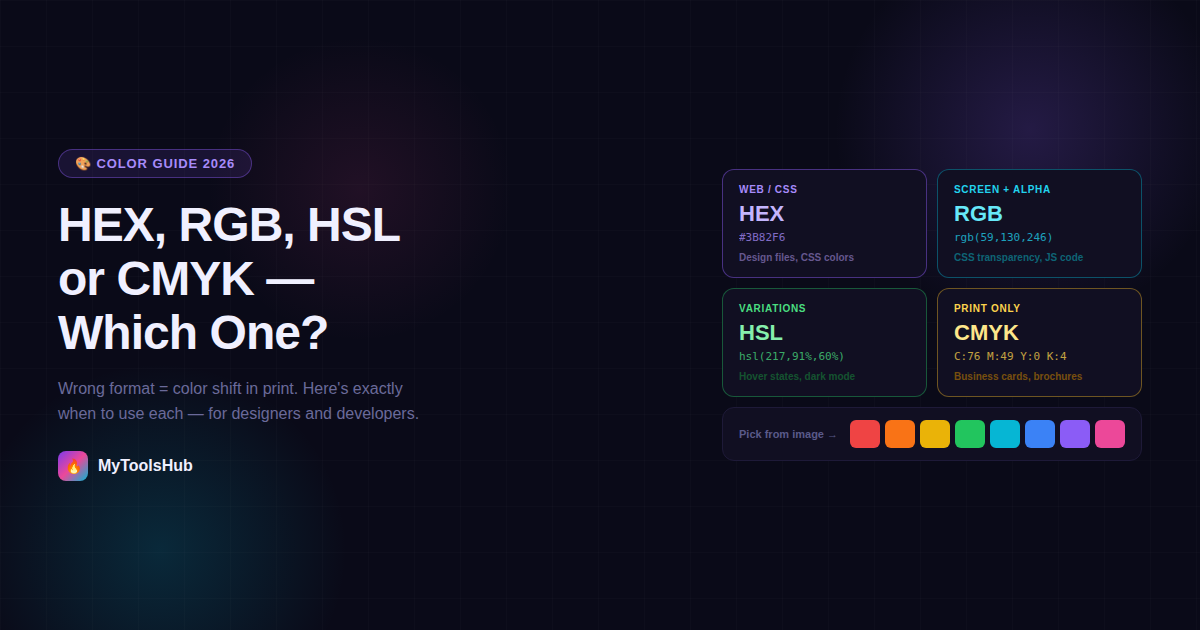
HEX, RGB, HSL or CMYK — Which Color Code Do You Actually Need?
You've matched a color perfectly on screen. The brand blue looks exactly right in your design file, your CSS, your presentation. Then it goes to print — and comes back noticeably duller. The blue you chose was vivid and electric. The printed version looks muted and slightly greenish. Nothing was done wrong, but the result is wrong. This is what happens when you send an RGB color to a CMYK printer without converting it first — and it's the most common color mistake in design workflows.
Color formats aren't interchangeable. HEX, RGB, HSL, and CMYK each exist for a specific purpose, and using the wrong one for the wrong context produces either wrong output (print color shift), extra work (converting formats later), or missed capability (not using HSL when it would make your code half as long). This guide explains each format clearly, shows you exactly when to use each one, and covers the cases where getting it wrong is expensive.
The Four Formats — What Each One Is and When to Use It
#3B82F6 · #FF5733 · #FFFFFF
HEX is RGB expressed in base-16 (hexadecimal) notation. The six characters break into three pairs: the first two represent Red, the next two Green, the last two Blue. #3B82F6 means R=59, G=130, B=246 in decimal — exactly the same color as rgb(59, 130, 246). They are not different colors; they are different notations for the same value.
HEX codes can be shortened when both digits in each pair are identical — #FFFFFF becomes #FFF, #000000 becomes #000.
⚠️ Don't use HEX for: When you need transparency (HEX has no native alpha channel — use
rgba() instead) or print output (CMYK required).
rgb(59, 130, 246) · rgba(59, 130, 246, 0.5)
RGB represents color as three numbers from 0–255, one for each light channel. It's the native color model of screens — every pixel on your monitor is physically made of red, green, and blue subpixels at different intensities. 0 means none of that color, 255 means full intensity.
The rgba() variant adds a fourth value (0–1) for opacity. rgba(59, 130, 246, 0.5) is the same blue at 50% transparency.
rgba()), JavaScript color calculations, image editing software, anywhere you need the full decimal value rather than hex shorthand.⚠️ Don't use RGB for: Print output. RGB has a wider gamut than CMYK — some vivid RGB colors physically cannot be reproduced with ink and will shift when printed.
hsl(217, 91%, 60%) · hsla(217, 91%, 60%, 0.5)
HSL represents color the way humans intuitively think about it. Hue is the color itself on a 0–360° wheel (0° = red, 120° = green, 240° = blue). Saturation is color intensity from 0% (grey) to 100% (full color). Lightness goes from 0% (black) to 100% (white), with 50% being the pure color.
The practical advantage: "make this color 10% lighter" is one change in HSL (increase L by 10). In RGB, you'd need to recalculate all three channels. In HEX, you'd need to convert to RGB first.
hsl(217, 91%, 50%) → hover hsl(217, 91%, 45%)), building full color palettes from a single base hue, dark mode implementations.⚠️ Don't use HSL for: Communicating specific brand colors to developers who expect HEX, or print output.
cmyk(76%, 49%, 0%, 4%) · C:76 M:49 Y:0 K:4
CMYK is the color model of physical printing. Each value represents what percentage of that ink gets applied to paper. The K (black) channel exists because mixing Cyan, Magenta, and Yellow at full intensity theoretically produces black but practically produces a muddy dark brown — black ink is needed separately for crisp text and deep shadows.
CSS does not support CMYK — it is exclusively a print format. When preparing designs for professional printing always convert your colors to CMYK and expect some color shift from what you see on screen because monitors and printers handle color very differently.
⚠️ Don't use CMYK for: Anything that stays on screen. CMYK has a narrower color gamut than RGB — digital files in CMYK will look duller on screen.
The Print Color Shift Problem — Why It Happens and How to Avoid It
Use RGB for anything that stays on a screen, like social media or website banners. Use CMYK for anything you intend to print, like business cards or stickers. This rule sounds simple, but the reason it matters is worth understanding — because it explains why conversion doesn't always produce a perfect match.
RGB is an additive model — it creates color by emitting light. A screen pixel literally glows red, green, or blue at different intensities. The more light added, the brighter and more vivid the color becomes. CMYK is a subtractive model — it creates color by absorbing light. Cyan ink absorbs red light, magenta absorbs green, yellow absorbs blue. The more ink applied, the darker the result.
CMYK has a narrower color gamut than RGB. Bright, saturated colors (especially neon greens, cyans, and magentas) often cannot be accurately reproduced in CMYK and will appear duller when printed. This isn't a printer quality problem — it's a fundamental physics limitation. No amount of ink quality or printer calibration will reproduce a color that sits outside the physical gamut of subtractive color mixing.
The practical solution: Print projects: Work in CMYK from the start to avoid color shift surprises. Setting your design tool to CMYK mode before you start means you're always working within the printable gamut. Colors that you choose will be colors that can actually be reproduced. Converting at the end — from an RGB design to CMYK for print — is where most color surprises happen, because that's when the out-of-gamut colors get mapped to their closest printable approximation.
HEX and RGB Are the Same Color — The Notation That Confuses Everyone
This is worth stating clearly because it's a genuine source of confusion. HEX and RGB represent the same color model. HEX is just RGB written in hexadecimal notation. #3B82F6 and rgb(59, 130, 246) are the same color expressed differently.
Breaking it down: #3B82F6 splits into three pairs: 3B, 82, F6. Converting each from hexadecimal to decimal: 3B = 59, 82 = 130, F6 = 246. So #3B82F6 = rgb(59, 130, 246) — exactly the same blue, in two different notations.
When should you use each?
- HEX in CSS:
color: #3B82F6;— more compact, standard practice for static colors - RGB in CSS:
color: rgba(59, 130, 246, 0.5);— when you need transparency, HEX has no native alpha channel - HEX in design files: When sharing brand colors with developers, HEX is universally understood and copy-pasteable
- RGB in code: When doing color calculations in JavaScript — arithmetic on decimal values (0–255) is more straightforward than hexadecimal arithmetic
Why HSL Is the Underused Format Designers Should Know
CSS color manipulation — use HSL. Adjusting lightness, creating hover states, and building color scales are all much easier in HSL than RGB or HEX. Despite this, many designers and developers default to HEX for everything — which works, but makes certain tasks unnecessarily complicated.
The clearest example is creating color variations. Suppose you have a brand blue at #3B82F6 and need a light version for a background and a dark version for text. In HEX, you'd need to pick values by eye or use a color tool. In HSL, the base color is hsl(217, 91%, 60%). The light background version is hsl(217, 91%, 95%). The dark text version is hsl(217, 91%, 30%). Only the Lightness value changes — Hue and Saturation stay identical, guaranteeing a harmonious family of colors that all derive from the same base.
Light mode button:
hsl(217, 91%, 60%)Dark mode button:
hsl(217, 91%, 70%)Hover state:
hsl(217, 91%, 50%)All three are the same color — just different lightness values. One variable controls the whole family.
How to Extract Any Color Format From an Image
An image color picker lets you click any pixel in an image and get its exact color code. You get the value in HEX, RGB, or HSL format instantly. Designers use them to match brand colors. Developers use them to copy UI elements. Marketers use them to keep visuals consistent.
The workflow is straightforward: upload the image, click on the pixel whose color you need, and get all four formats — HEX, RGB, HSL, and CMYK — simultaneously. This is useful for:
- Matching brand colors from a logo: Get the exact HEX to use in CSS, and the CMYK values to send to a printer for stationery or packaging
- Building a color palette from a reference image: Pick dominant colors from a photo, a competitor's website screenshot, or an inspiration image
- Identifying exact shades: When a client says "use that exact shade of blue from the product photo," a color picker gives you the precise code rather than a visual approximation
- Converting between formats: If you have a color in HEX and need CMYK for a print vendor, a color picker tool does the conversion alongside extraction
Format Comparison at a Glance
| Format | Used For | Gamut | Transparency | Print Safe |
|---|---|---|---|---|
| HEX | Web CSS, design files | Screen (RGB) | No (8-digit HEX adds alpha) | ❌ No |
| RGB / RGBA | CSS with transparency, JS | Screen (wide) | ✅ Yes (rgba) | ❌ No |
| HSL / HSLA | CSS color variations, themes | Screen (RGB) | ✅ Yes (hsla) | ❌ No |
| CMYK | Print production | Print (narrow) | No | ✅ Yes |
Frequently Asked Questions
What is the difference between HEX and RGB color codes?
HEX and RGB represent exactly the same colors — HEX is simply RGB written in base-16 notation. #3B82F6 and rgb(59, 130, 246) are identical. Use HEX in CSS for static colors — it's compact and universally understood. Use RGB when you need an alpha transparency channel (rgba()) or when doing color arithmetic in JavaScript.
When should I use HSL instead of HEX or RGB?
When you need to create color variations programmatically — hover states, tints, shades, dark mode. HSL represents color as Hue (the color itself), Saturation (intensity), and Lightness (brightness). Making a color 10% lighter is one Lightness change in HSL. In RGB or HEX, you'd need to recalculate all three channels.
Why do colors look different when printed vs on screen?
Screens use RGB (additive light mixing) while printers use CMYK (subtractive ink mixing). RGB has a wider gamut — it can display vivid colors that cannot physically be reproduced with ink. When an RGB file reaches a printer without CMYK conversion, the auto-conversion shifts out-of-gamut colors to their closest printable approximation, which is always duller. Convert to CMYK before sending to print, ideally from the start of the design process.
What does K stand for in CMYK?
K stands for Key, meaning black. It's not B to avoid confusion with Blue in RGB. The K channel exists because mixing C+M+Y at full values produces muddy dark brown rather than true black — a dedicated black ink is required for sharp text and deep shadows.
How do I get the exact color code from an image?
Upload the image to a color picker tool, click on the pixel you want, and get the HEX, RGB, HSL, and CMYK codes simultaneously. Browser-based tools that process locally (no server upload) are best for client work or unreleased designs.
If you're working with images and colors, you might also find our Image Resizer useful for getting images to the exact dimensions each platform needs, and our Background Remover for isolating subjects before placing them on brand-colored backgrounds.

Comments (0)
Leave a Comment