
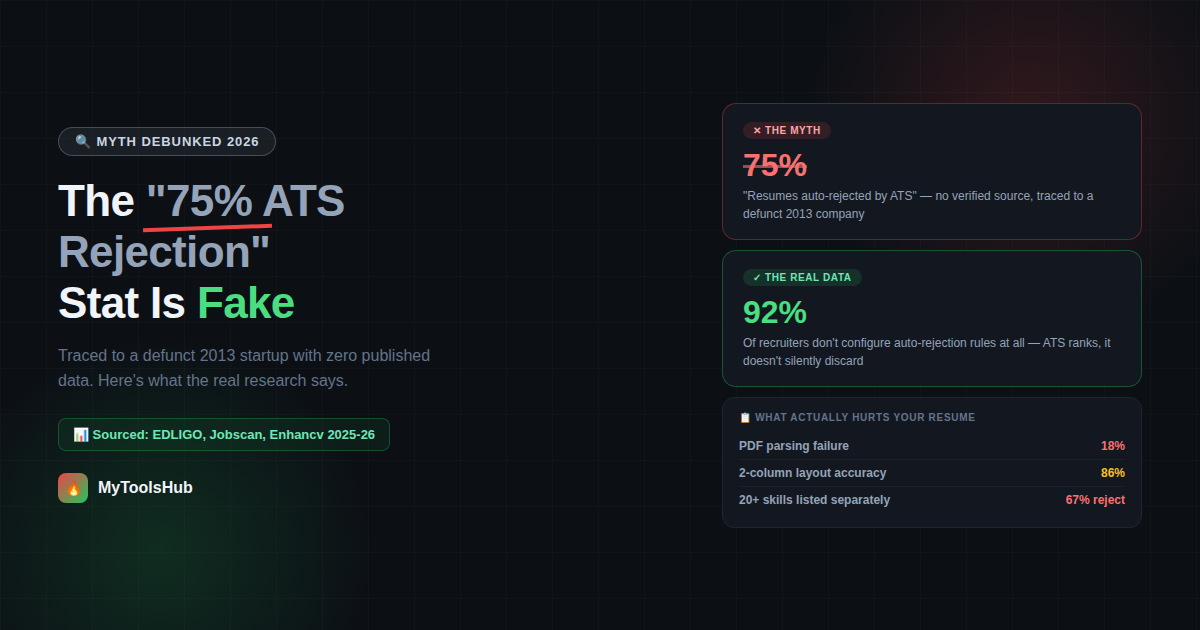
The "75% of Resumes Get Rejected by ATS" Stat Is Fake — Here's What Actually Happens
You've probably seen the statistic. It's in countless resume articles, LinkedIn posts, and career coaching pitches: "75% of resumes are rejected by ATS before a human ever sees them." It's repeated so often and so confidently that it functions as established fact. There's just one problem — nobody can find where it actually came from.
A career consultant traced the claim back to Preptel, a resume-services company that shut down in August 2013. They never published any methodology. When the claim was checked against Google Scholar for academic research supporting it, the search returned zero results. The number spread the way unverified statistics often do online: a 2014 article cited Preptel, a later piece cited that article, and a subsequent piece cited the second one — a citation chain where nobody went back to verify the original source.
This matters because believing a fake statistic leads to the wrong fixes. If you think 3 out of 4 resumes get silently discarded by an algorithm, you optimize for tricking a robot. The real, sourced 2025-2026 data tells a more useful and more actionable story.
What ATS Software Actually Does
An Applicant Tracking System is software that employers use to manage the hiring pipeline: collecting applications, extracting resume data into structured fields, and helping recruiters search and filter candidates. It is primarily an organizational tool, not a ruthless autonomous gatekeeper.
This distinction matters more than it sounds. A 2025 study of 25 US recruiters across more than 10 ATS platforms found that 92% do not configure auto-rejection rules based on resume content. What actually filters candidates before human review are knockout questions — hard requirements like work authorization status or minimum years of experience, configured by the employer as explicit application questions, not algorithmic judgments about resume quality.
Myth vs Fact — Separating What's Real From What's Repeated
What Actually Causes Parsing Failures — The Real Numbers
Strip away the myths and a clear, technically grounded picture emerges of what genuinely hurts a resume's chances. This is sourced from EDLIGO's 2025 analysis of 1,000 rejected resumes across Workday, Taleo, and Greenhouse — three of the most widely used ATS platforms.
| Factor | Failure / Rejection Rate | Comparison |
|---|---|---|
| PDF format | 18% parsing failure | vs 4% for DOCX |
| Two-column layout | 86% parsing accuracy | vs 93% for single-column |
| Contact info in header/footer | 25% of ATS fail to parse it | Invisible even if rest parses fine |
| 20+ skills listed separately | 67% rejection rate | vs 34% when integrated into experience |
| Tables, text boxes, images | 43% of ATS systems error | Across systems tested in 2025-2026 |
| Low keyword match (under 5%) | 50% lower pass-through | vs resumes with 10-15% keyword match |
The pattern across every one of these factors is the same: structural simplicity and contextual keyword usage beat complexity and keyword density. None of these fixes require gaming an algorithm — they require building a resume the way a human would read it cleanly too, which is precisely why "optimizing for ATS" and "writing a genuinely good resume" overlap more than most advice suggests.
The Real Bottleneck: Most Resumes Score Low Before Any Human Bias Enters
Separate from formatting, content quality against the specific job posting is the other major lever. Real pipeline data from anonymized resume scoring shows a median ATS score of 48 out of 100, with 52% of job-description keywords missing from the average submitted resume. The average unoptimized resume scores around 55%, with most ATS experts recommending a target of 80% or higher for strong pass-through likelihood.
Resumes with a 10-15% keyword match rate to the job description have 50% higher ATS pass-through rates than those below 5%. This is the single highest-leverage fix available to most job seekers: read the job posting closely, identify the specific terms it uses for skills and responsibilities, and use those same terms (where genuinely accurate) rather than synonyms.
Why Tailoring Each Application Beats a Single Master Resume
Sending the same resume to every job posting is convenient but measurably less effective. Jobscan's analysis of nearly 1 million job applications found a significant increase in callback rates for candidates who tailor their resume for each specific job posting versus sending a generic version. Resumes containing keywords directly pulled from the job description are 40% more likely to be selected for human review.
This doesn't mean rewriting your entire resume for every application. It means adjusting the top third — the summary, key skills, and the language used to describe your most relevant experience — to mirror the specific posting's terminology. A 15-minute tailoring pass before submission produces a measurably different outcome than a one-size-fits-all document.
What Human-Configured Filters Actually Reject Candidates
The actual gatekeeping in modern hiring pipelines happens through filters that recruiters explicitly configure — not algorithmic judgment calls about resume quality. Over 50% of companies configuring their ATS identify employment gaps of 6 or more months as a screening criterion, making it the single most common human-configured filter causing rejections.
Other common human-configured knockout criteria:
- Minimum years of experience — a hard cutoff set by the hiring manager, not inferred by the algorithm
- Work authorization status — frequently an explicit application question rather than resume-parsed data
- Required certifications or degrees — set as a binary requirement for certain regulated or technical roles
- Location / willingness to relocate — often a direct question rather than something parsed from a resume address line
The practical implication: if you're being filtered out and you meet the actual qualifications, the cause is more likely to be a parsing failure (your data didn't extract into the right field) or a genuine knockout criterion (an employment gap, missing credential) than an algorithm silently judging your resume's quality.
A Practical Format Checklist Based on the Real Data
- Use DOCX unless a PDF is specifically requested — 4% failure rate vs 18% for PDF, based on the largest available dataset.
- Stick to a single-column layout — 93% parsing accuracy vs 86% for two-column designs that look modern but confuse the parser's reading order.
- Put contact information in the document body, not the header or footer — a quarter of systems simply don't read header/footer content.
- Avoid tables, text boxes, and embedded graphics — these cause parsing errors in over 40% of systems tested, scrambling or dropping the content inside them.
- Integrate skills into experience bullets rather than listing 20+ in a block — the rejection rate nearly doubles for the list-only approach.
- Match 10-15% of the job description's specific keywords naturally — the sweet spot that measurably improves pass-through without reading as keyword-stuffed to a human reviewer.
Why "Designer" Resume Templates Often Underperform
Resumes built on heavily designed templates — multi-column layouts, icon-based skill bars, graphic timelines — look impressive to a human eye on first glance, but studies show resumes containing tables, graphics, images, or complex multi-column layouts lose 50% or more of their content when parsed by ATS software. A visually striking resume that a recruiter never actually sees in its parsed form provides zero benefit during automated screening — the visual polish only matters once a human is already looking at the file directly, which happens after the ATS-parsed version has already been ranked.
The practical resolution isn't to abandon good design entirely — it's to separate the two contexts. A simple, single-column, ATS-safe version for online application portals where parsing matters, and a more visually designed version (if desired) for situations where you're handing a resume directly to a person — a networking event, an email attachment to a hiring manager, a printed copy for an interview.
How Long Recruiters Actually Spend Looking at Resumes
Beyond the ATS layer, it's worth understanding what happens once a resume reaches human review — because the same principles of clarity and structure that help with parsing also matter here, for different reasons.
Recruiter attention at the human-review stage is genuinely brief — typically measured in seconds for the initial pass, not minutes. This is precisely why the structural clarity that helps ATS parsing also helps human reviewers: a resume organized into clear, scannable sections with the most relevant information in the top third gets a fair read in the brief window most recruiters spend on a first pass. A resume that's visually cluttered or buries key qualifications in dense paragraphs loses on both fronts simultaneously — the parser struggles with it, and so does the human skimming it afterward.
This is the practical reason "ATS-friendly" and "well-organized for a human" converge so heavily: both readers — the algorithm and the recruiter — benefit from the same things. Clear section headers (Experience, Education, Skills). Reverse-chronological order. Specific, quantified achievements rather than vague responsibility statements. A clean, single-column flow that doesn't require guessing where to look next.
Building This Into Your Resume From the Start
Rather than building a resume and then trying to retrofit ATS-friendliness onto it, the data above points to a more efficient approach: build with the constraints in mind from the first draft.
- Start with a single-column structure — resist the temptation toward a two-column "modern" layout, since the parsing accuracy gap (93% vs 86%) compounds across every section of the resume, not just one.
- Write experience bullets that naturally include relevant terms — rather than a separate skills dump, weave the specific tools, methods, and competencies into the achievement descriptions where they belong contextually. "Led a cross-functional team using Agile methodology to ship features 30% faster" does more work than a bullet point list that says "Agile" with no context.
- Keep contact details in the main body, top of the document — not in a designed header element, regardless of how clean it looks visually.
- Pull 10-15% of your keywords directly from the specific job posting before submitting — not generic industry terms, the actual phrases used in that posting's requirements and responsibilities sections.
- Save a master version, then tailor a copy per application — adjusting the summary and top skills section to mirror each specific posting takes minutes and measurably improves callback rates.
None of this requires gaming a system. It requires building a document that's genuinely easy for both software and people to read accurately — which, based on the actual 2025-2026 data, turns out to be the same target either way.
Frequently Asked Questions
Is it true that 75% of resumes are rejected by ATS before a human sees them?
No, this statistic has no verified source. It traces back to a defunct 2013 company that never published its methodology. The figure spread through an unverified citation chain across multiple articles. Real 2025-2026 research shows ATS systems primarily rank and sort resumes rather than auto-rejecting them outright.
What actually causes a resume to fail ATS screening?
Parsing failures from complex formatting are the main technical cause — tables, text boxes, and graphics cause errors in 43% of ATS systems, and multi-column layouts achieve only 86% parsing accuracy versus 93% for single-column. Low keyword match with the job description is the other major factor — resumes with 10-15% match have 50% higher pass-through rates than those below 5%.
Should I submit my resume as a PDF or Word document?
DOCX has a 4% parsing failure rate compared to 18% for PDF, based on analysis of 1,000 rejected resumes. If a posting specifically requests PDF, follow that instruction — modern ATS platforms parse PDFs reasonably well for properly structured documents. With no stated preference, DOCX is the statistically safer default.
Does putting my contact information in a header or footer cause problems?
Yes. A quarter of ATS systems fail to parse contact information stored in headers or footers, meaning your name, email, or phone number may be invisible even though the rest of your resume parses correctly. Place contact information in the main document body.
Does listing many skills separately help or hurt my resume?
It hurts more often than it helps. Resumes with 20+ skills listed separately in a block had a 67% rejection rate in one large analysis, while the same skills integrated naturally into experience descriptions had only a 34% rejection rate. Context matters to modern ATS systems, not just keyword presence.
Once your resume is ready, our Word Counter can help you check that your summary and bullet points stay within recommended length, and our PDF to Word Converter is useful if you need to edit a resume you only have in PDF form.
Comments (0)
Leave a Comment